Core Web Vitals are the closest thing Google gives you to a public report card on user experience — and they are a confirmed ranking signal. But rankings are only half the story. The same lag that annoys Google’s algorithm makes real visitors abandon your page before they ever become a lead. Fix your vitals and you often win rankings and revenue in a single move. Let us unpack exactly what these metrics measure, how to diagnose them, and how to fix each one.
Google defines the official thresholds in its web.dev Core Web Vitals guide — worth a read once you understand why they matter to your bottom line.
What Core Web Vitals actually measure
Core Web Vitals are three field measurements taken from real Chrome users visiting your site — not a lab guess. That distinction matters. Google ranks on what your actual visitors experience, so a perfect lab score paired with poor field data still hurts you.
The three metrics cover the three things a user physically feels: how fast the page loads, how quickly it responds to taps, and how stable it stays while loading. Miss any one and the experience feels broken, even if the other two are perfect.
LCP — Largest Contentful Paint
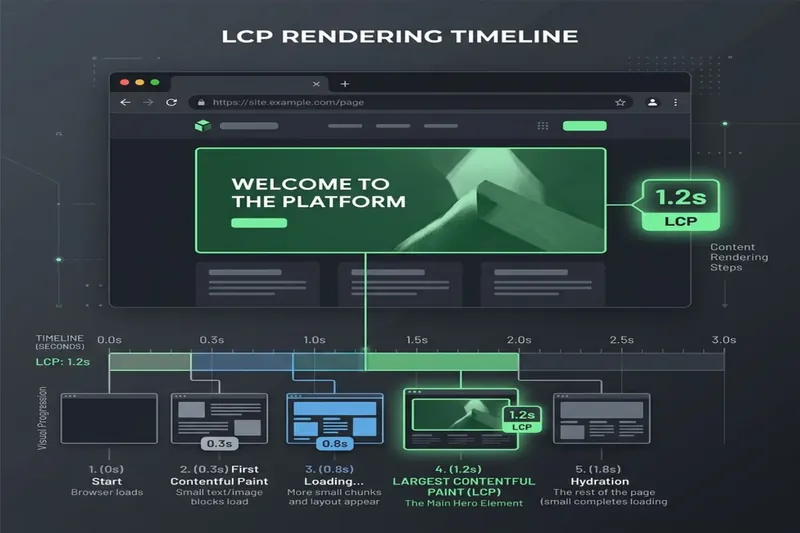
LCP measures how long it takes for the biggest element in the viewport — usually your hero image or headline — to render. It is a proxy for the question every visitor asks: “Is this page ready yet?”
- Good: under 2.5 seconds
- Needs improvement: 2.5 to 4.0 seconds
- Poor: over 4.0 seconds
INP — Interaction to Next Paint
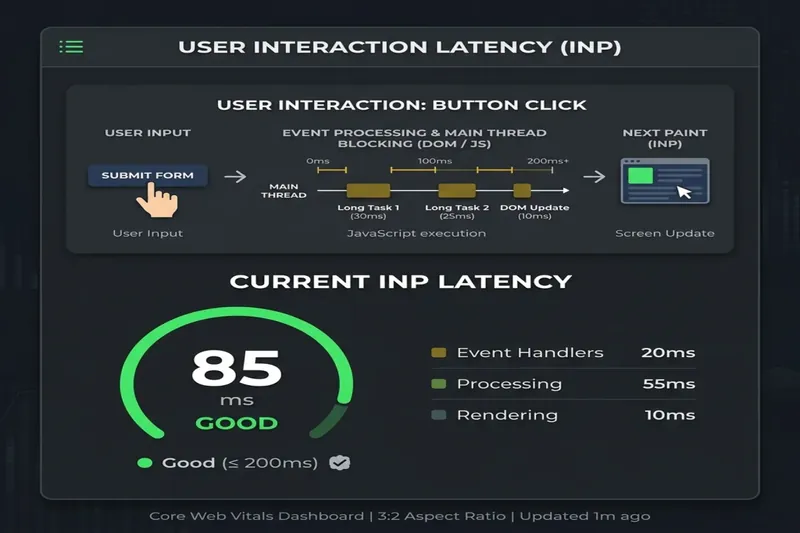
INP replaced First Input Delay in March 2024. It measures responsiveness across the whole visit: when a user taps a button, opens a menu, or submits a form, how long until the page visibly reacts?
- Good: under 200 milliseconds
- Needs improvement: 200 to 500 milliseconds
- Poor: over 500 milliseconds
High INP almost always means too much JavaScript blocking the main thread. The browser is busy running scripts, so it cannot answer the tap.
CLS — Cumulative Layout Shift
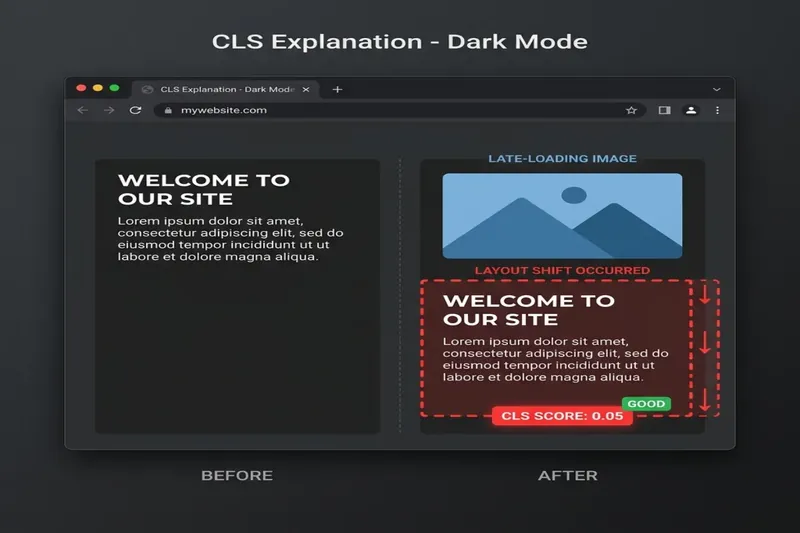
CLS quantifies visual stability — how much the page jumps around as it loads. We have all tapped a button that moved at the last second because an ad or image loaded late, then clicked the wrong thing.
- Good: under 0.1
- Needs improvement: 0.1 to 0.25
- Poor: over 0.25
Speed is not a vanity metric. Every 100 milliseconds you shave off load time is measurable conversion lift — and Google rewards the same thing your customers do.
Why Google cares — and why you should care more
Google’s job is to send searchers to pages that satisfy them. A page that loads slowly, jumps around, and freezes on tap is a bad experience, so it gets a nudge down the results.
But the ranking effect is often smaller than the business effect. Slow pages leak revenue at every step: fewer people wait for the page, fewer scroll, fewer convert. When two pages are equally relevant, Core Web Vitals become the tiebreaker — and on mobile, where most searches happen, they bite hardest.
Think of it as a funnel tax. If your LCP is 5 seconds, a chunk of paid and organic traffic bounces before your offer even renders. You already paid for that click. A green vitals profile stops that leak.
How to diagnose your Core Web Vitals: field vs lab
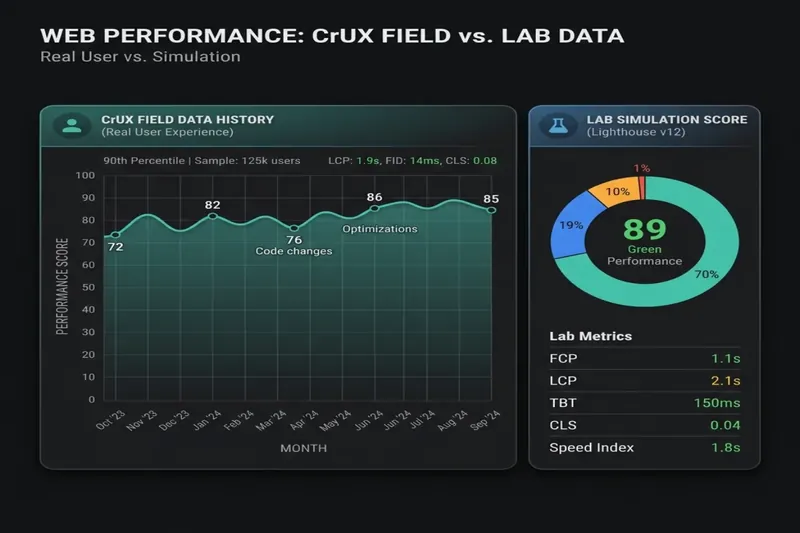
This is where most people go wrong. There are two kinds of data, and only one of them affects your rankings.
- Field data (CrUX): real visitor experiences over a rolling 28-day window, pulled from the Chrome User Experience Report. This is what Google ranks on.
- Lab data (Lighthouse): a single simulated load in a controlled environment. Useful for debugging, but it is a snapshot, not reality.
Run your URL through PageSpeed Insights. The top panel shows field data if your page has enough traffic; the bottom shows lab diagnostics. Chase the green lab score, but confirm the actual win in the field.
For a site-wide view, open the Core Web Vitals report in Google Search Console. It groups your URLs into good, needs-improvement, and poor buckets by real-world performance — so you fix categories of pages, not one URL at a time.
How to fix LCP
- Optimise the hero image: serve modern formats (AVIF or WebP), size it to the actual display dimensions, and never lazy-load the LCP element.
- Preload critical assets: the LCP image and key web fonts, so the browser fetches them immediately instead of discovering them late.
- Cut server response time: good hosting, page caching, and a CDN. A slow first byte (TTFB) caps how fast anything else can be.
- Reduce render-blocking CSS/JS: inline critical CSS and defer the rest so the browser can paint sooner.
On WordPress, the usual LCP killers are unoptimised page-builder hero sections and bloated themes. A lean, purpose-built theme sidesteps most of it before you install a single plugin.
How to fix INP
- Ship less JavaScript: the single biggest lever. Every unused script you remove frees the main thread to answer taps.
- Break up long tasks: split heavy work into smaller chunks so the browser can respond to interactions between them.
- Defer third-party tags: chat widgets, heatmaps, and ad scripts are the usual INP offenders. Load them late or only on interaction.
- Audit your plugins: on WordPress, one poorly coded plugin can wreck INP across the whole site. Measure before and after each install.
INP is the metric most sites now fail, because it grades every interaction, not just the first. If your menu, filters, or add-to-cart feel sticky, that is INP costing you conversions in real time.
How to fix CLS
- Set explicit width and height on every image and video, so the browser reserves the space before the file loads.
- Reserve space for ads and embeds with a fixed container instead of letting them push content down on arrival.
- Preload fonts and use
font-displaycarefully to stop text reflowing when the custom font swaps in. - Never insert content above existing content after load — cookie bars and promo banners are common culprits.
CLS is usually the cheapest of the three to fix. Most of it comes down to dimensions and reserved space — a few hours of engineering that pays back on every visit.
How Core Web Vitals tie to leads and revenue
This is the part most SEO advice skips. Vitals are not a checkbox — they are a revenue lever. Faster, more stable pages keep more of the traffic you already worked to earn.
- Lower bounce: visitors abandon slow pages before your offer renders, so a faster LCP means more people actually see it.
- Higher form and checkout completion: snappy INP keeps users moving through multi-step flows instead of rage-quitting.
- Fewer misclicks: stable CLS stops accidental taps that derail a conversion or trigger a bounce.
- Cheaper paid traffic: a fast landing page lifts Quality Score, which lowers your Google Ads cost per click.
These figures vary by site, but the direction is consistent across every audit I run: the pages with green vitals convert better than their slow siblings targeting the same keyword. That is why I treat performance as part of SEO services, not a separate nice-to-have.
Where this fits in the bigger picture
Core Web Vitals will not rescue thin content or a page nobody wants — relevance and content quality still do the heavy lifting. But among good pages competing for the same query, speed and stability are a genuine, sustained edge.
On every site I build, green field vitals are the baseline, not the goal, because the same engineering that pleases Google turns visitors into leads. A fast, SEO-first WordPress development foundation makes hitting these thresholds far easier than retrofitting a bloated theme later.
FAQ
Are Core Web Vitals a ranking factor?
Yes. Core Web Vitals are a confirmed part of Google’s page experience signals. The effect is strongest as a tiebreaker between pages of similar relevance, and it is most noticeable on mobile.
What is a good Core Web Vitals score?
Aim for LCP under 2.5 seconds, INP under 200 milliseconds, and CLS under 0.1. To officially pass, you need to hit these at the 75th percentile of real visitors in the field data.
Why does my lab score pass but the field data fails?
Lab tests run on a fast, controlled connection. Real users have slower devices, weaker networks, and more browser tabs open. Google ranks on the field data, so always trust CrUX and Search Console over a single Lighthouse run.
How long until fixes show up in rankings?
Field data uses a rolling 28-day window, so give it about four weeks after deploying fixes before the CrUX report reflects the improvement. Conversion gains, however, often show up in your analytics the same week.
Takeaway
Get LCP, INP, and CLS into the green and you improve two things at once: your position in search and your ability to convert the traffic that arrives. Diagnose with field data, fix the specific metric that is failing, and treat performance as a revenue project — not a technical chore. Ask me for a free Core Web Vitals check and I will tell you exactly what is costing you leads.